Für das Debuggen innerhalb von WordPress gibt es verschieden Ansätze und Vorlieben. Ich mag xDebug und in einigen Fällen nutze ich FirePHP. Nun ist ein weitere Möglichkeit in meinen Fokus gerückt und ich musste es zumindest mal testen – debugConsole – es gefällt mir.
The debugConsole is a tool for debugging and tracing PHP5 applications on productive servers without compromising the live-traffic.
Warum also nicht auch hier und darum hier eine kleiner Hinweis und ein kleines erstes Plugin zum spielen und testen der Konsole.
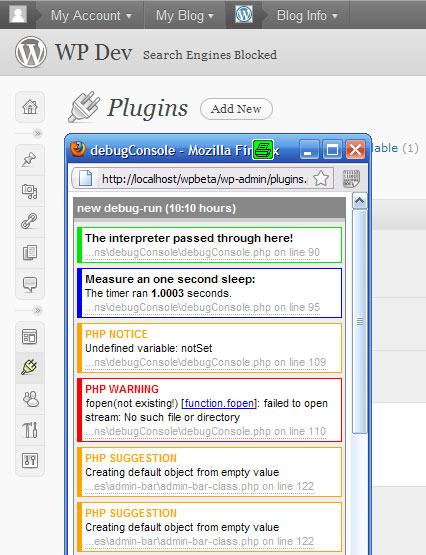
Aktuell habe ich nur ein Demo-Plugin erstellt, was die Funktion zeigt. Es wird auch nicht gepflegt, kann aber hier herunter geladen werden. Als kleiner Start quasi und schneller Blick auf die Möglichkeiten. Ich habe dabei die Beispiele des Autors der debugConsole integriert.
Das Plugin hat folgenden Quellcode und ihr könnt an jeder URL aus der WP-Installation den String ?debug=true anhängen, so dass das Popup mit den Informationen der Konsole aufgerufen wird. Aktuell ist dies für Frontend und Backend möglich.
<?php
/*
Plugin Name: debugConsole
Plugin URI: https://bueltge.de/
Text Domain: debugconsole
Domain Path: /languages
Description: The <a href="http://www.debugconsole.de/">debugConsole</a> is a tool for debugging and tracing PHP5 applications on productive servers without compromising the live-traffic. Add <code>?debug=true</code> to the URL for see the Popup-Window with debugConsole
Author: Frank Bültge
Version: 0.1
Author URI: https://bueltge.de/
Donate URI: https://bueltge.de/wunschliste/
License: Apache License
Last change: 14.10.2010 11:30:51
*/
/**
License:
==============================================================================
Copyright 2010 Frank Bueltge (email : frank@bueltge.de)
This program is free software; you can redistribute it and/or modify
it under the terms of the GNU General Public License as published by
the Free Software Foundation; either version 2 of the License, or
(at your option) any later version.
This program is distributed in the hope that it will be useful,
but WITHOUT ANY WARRANTY; without even the implied warranty of
MERCHANTABILITY or FITNESS FOR A PARTICULAR PURPOSE. See the
GNU General Public License for more details.
You should have received a copy of the GNU General Public License
along with this program; if not, write to the Free Software
Foundation, Inc., 59 Temple Place, Suite 330, Boston, MA 02111-1307 USA
Requirements:
==============================================================================
This plugin requires WordPress >= 2.7 and tested with PHP Interpreter >= 5.2.9
*/
/* PHP5 required */
if (version_compare(PHP_VERSION, '5.0.0') < 0) {
die('The debugConsole requires PHP 5.x.x or greater.');
}
/* load debugConsole functionality */
require_once 'debugconsole-1.3.0/debugConsole.php';
// add ?debug=true to the URL
if ( isset($_GET['debug']) && $_GET['debug'] == 'true') {
add_action( 'wp_footer', 'wp_debug_console' );
add_action( 'admin_footer', 'wp_debug_console' );
}
function wp_debug_console() {
/**
* debugConsole demonstration
*
* This script demonstrates each feature of the debugConsole. The
* debugConsole is a PHP5 class using JavaScripts to show debug
* information in a popup window. The popup has IP-based access
* control. Configurate everything in debugConsole.config.php.
* Additionally, PHP's default errorhandler is replaced.
*
* @author Andreas Demmer <mail@andreas-demmer.de>
* @version 1.0.1
* @package debugConsole_1.2.0
*/
/*
Now you got an extended commandset:
dc_watch() watch variable changes in console
dc_dump() var_dump variables in console
dc_here() mark checkpoints in console
dc_start_timer() measure a timespan
dc_stop_timer() output timespan in console
*/
/* test watches */
dc_watch('foo');
declare (ticks = 1) {
$foo = '1';
$foo++;
/* test checkpoints */
dc_here('The interpreter passed through here!');
/* test timer clock */
$myTimer = dc_start_timer('Measure an one second sleep:');
sleep(1);
dc_stop_timer($myTimer);
/* test variable debugging */
$bar = 42.0;
dc_dump($bar, '$bar tells us the meaning of life:');
$foobar = array (
'foo' => $foo,
'bar' => $bar
);
dc_dump($foobar, '$foobar is a neat array!');
/* test errorhandling */
echo $notSet;
fopen('not existing!', 'r');
}
}
Download als zip-Datei: debugConsole.zip – 131 kByte
